Assist
ATE·IQ Chat
A co-pilot that actually sees the project. Its context is curated per query — the artefacts that matter for the question, not a dumped folder — and its answers can call real tools mid-conversation: tester knowledge, STDF statistics, board validation, spec compliance. What comes back is an answer with its sources attached.
Overview
Most code assistants answer from what happens to be in the window. ATE·IQ Chat answers from the project — the ingested spec, the workbook's sheets and VBA, the saved board designs, the parsed lots — and when a question needs a computation, it computes rather than recalls.
When an answer needs a number, the number is computed on your stored artefacts, never recalled from the model's memory. A compliance verdict, a Cpk, a DRC finding or a pin lookup in a chat answer agrees with the corresponding dashboard — same inputs, same answer; the conversation and the dashboard cannot disagree.
Curated context
Each query sees a curated slice of the project — workbook sheets, VBA modules, board designs, requirements — chosen for the question at hand rather than dumped wholesale. The context bar shows the chips that made the cut.
That selection is open to inspection on the Context Curator page — toggle it item by item, hand it off to a chat session — so an engineer can see, and shape, exactly what the model receives before a single token leaves the machine.
The tools
Called by the model mid-answer and rendered as cards in the conversation, so the engineer sees what ran and what it returned.
| Tool group | What it does |
|---|---|
| IG-XL knowledge | Looks up documented instrument rules and settle times, flags documented prohibitions, answers VBT API questions with the exact access path to call, offers debug and best-practice guidance, and searches the operator's own UltraFLEX Help installation (~17,000 pages, indexed and searched entirely on the operator's machine — never shipped with the product). |
| STDF | The full analytics suite from the STDF page — lot summaries, yield, parametric Cpk, cross-lot correlation, outlier screens — computed live from the parsed binaries. |
| PCB | Validates or analyzes a saved design by name, searches the reference parts library and pulls part details, and makes design edits — every edit is checked before it lands and journals to revision history. |
| Spec compliance | Requirement coverage and limit comparison, with each disagreement attributed to the pillar that owns it — reconciled mechanically, so chat and the traceability dashboard give the same answer from the same inputs. |
| Limit proposal | Proposes program limits from measured lot statistics and classifies each proposal — tighten, widen, or leave alone — and honestly flags where the data is too thin or the process cannot support the spec. No model in the loop — the numbers are computed, and it is a proposal only; it never writes a limit. |
Proven end to end
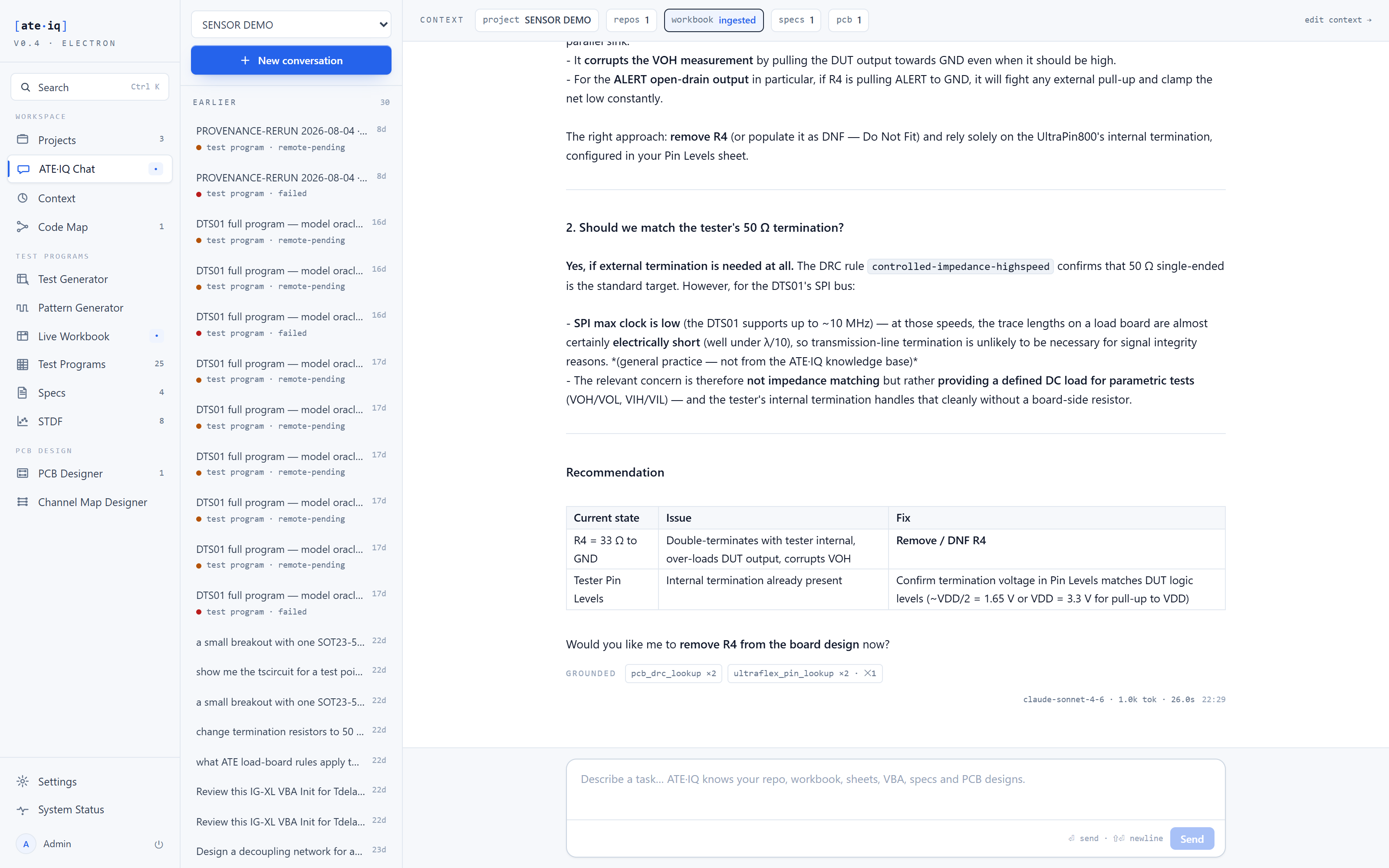
The exchange in Fig. 1 is the demonstration board-review conversation: asked what the 33 Ω resistor R4 is doing, the assistant reasons that ALERT is an open-drain output so R4 to ground would fight any external pull-up, checks the tester's defined 50 Ω termination in Pin Levels, notes that at the device's SPI clock rates transmission-line termination on a load board is unlikely to be needed, cites the DRC rule it checked, and recommends Remove / DNF R4 — offering to apply the removal as a design edit, checked before it lands. Ask the same session to review spec compliance and it reports the same picture the traceability dashboard renders — same inputs, same answer: 34 of 34 requirements covered, one documented measurement-path compensation reported as informational, not as a violation.