Control
Context Curator
The one question every engineer asks an AI tool and rarely gets answered: what will the model see? The curator scores your whole project against the task you type, shows every candidate with its score and why it matched, lets you toggle and pin, and hands exactly that context to the chat. No LLM is involved in any of it.
Overview
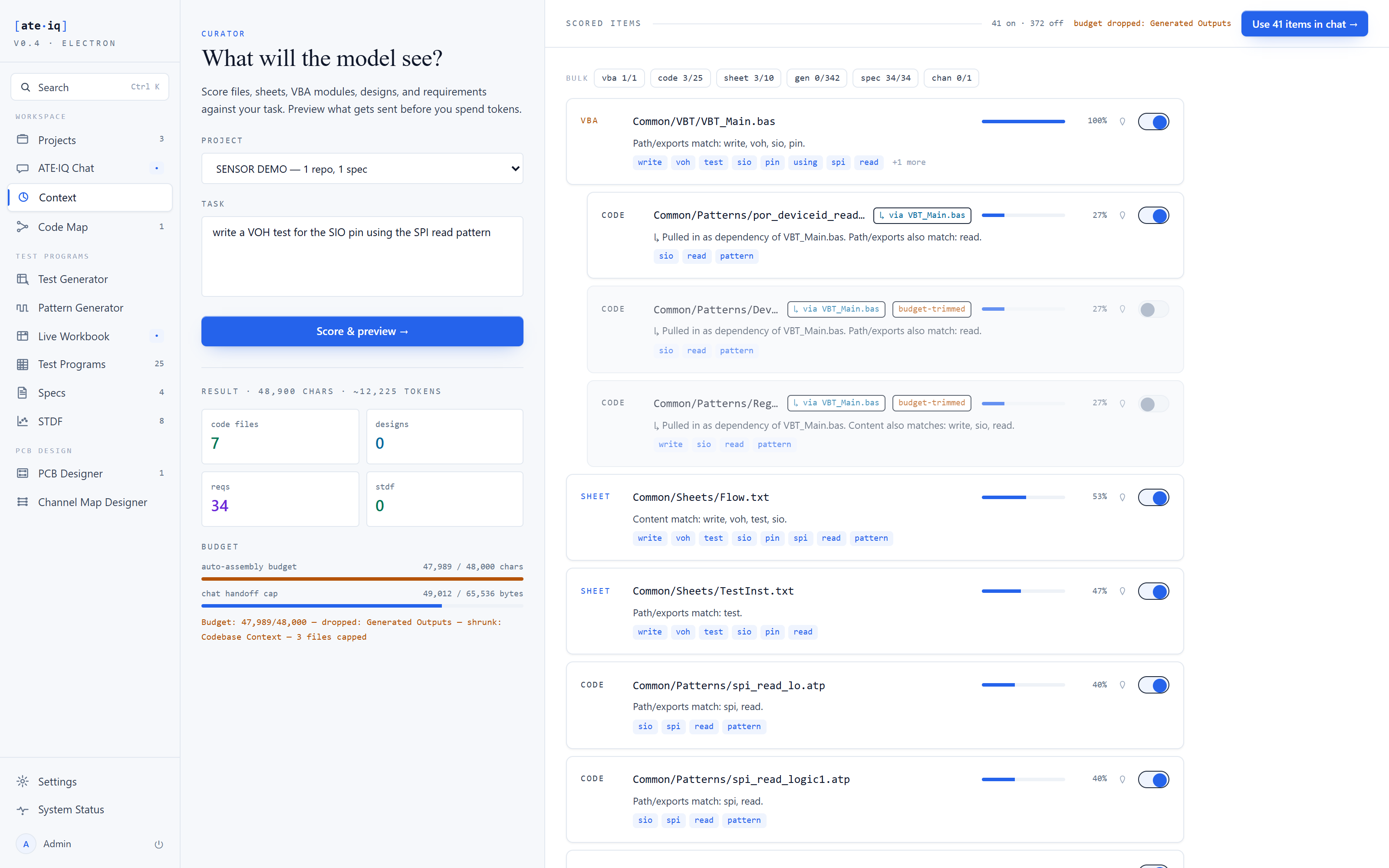
Type a task, press Score. The curator runs deterministic keyword scoring over the project corpus — code files, IG-XL sheets, VBA modules, PCB designs, requirements, STDF lots, generated outputs and the channel plan — and renders the ranked result as a list of toggleable items, each showing the tokens it matched on. The curated context you preview is the curated context the chat uses — same selection, same assembly, nothing swapped behind your back.
Scoring is deterministic: same project, same task, same result. Re-scoring costs nothing — it happens as you type — because there is no LLM call to pay for. The model is only invoked later, in the chat, with the context you approved.
Toggles, pins, bulk controls
Every scored item carries a toggle. Flip one and the assembled preview updates as you do — you watch the context change as you change it. Per-kind bulk toggles flip a whole class in one click: all requirements off, all patterns on.
Pins are for the items you always want. A pinned item survives re-scores — even when a new task's scoring drops it from the visible list entirely, it still travels with your selection into the assembled context. Pins persist per project across reloads. One rule keeps intent unambiguous: an item you explicitly toggled off stays off, pin or no pin.
Budgets and the handoff
Two ceilings govern what can actually reach the model, and both render as live meters. The chat context budget is 48,000 characters: when the assembled sections exceed it, the lowest-scoring sections are shrunk or dropped first, and the cut is disclosed — dropped sections are named in the preview, and every trimmed item carries a budget-trimmed badge. An item cut by the budget can never read as included. The handoff cap is 64 KB of UTF-8: an over-cap handoff is refused at the button with the size that has to come out — the cap is a hard ceiling, enforced end to end, not advice.
The handoff itself is one click. The curated selection is saved as a draft the chat picks up automatically — it survives a reload and a new tab, expires after 24 hours, prefills the composer with your task, and is consumed only on the first successful send. A send that fails leaves the draft intact.
Proven end to end
Score the demonstration project against "write a VOH test for the SIO pin using the SPI read pattern" and the ranking is legible at a glance: the implementing module first, the read-pattern files on their exact names, and the sheets and requirements that mention VOH and SIO — with the unrelated hundreds of artefacts scored low and off by default, landing at 41 items on, 372 off. Toggling a large generated output on pushes the meter over the 48,000-character budget and the preview says exactly which section was dropped to fit — before anything is sent.