The agent
The IG-XL Agent
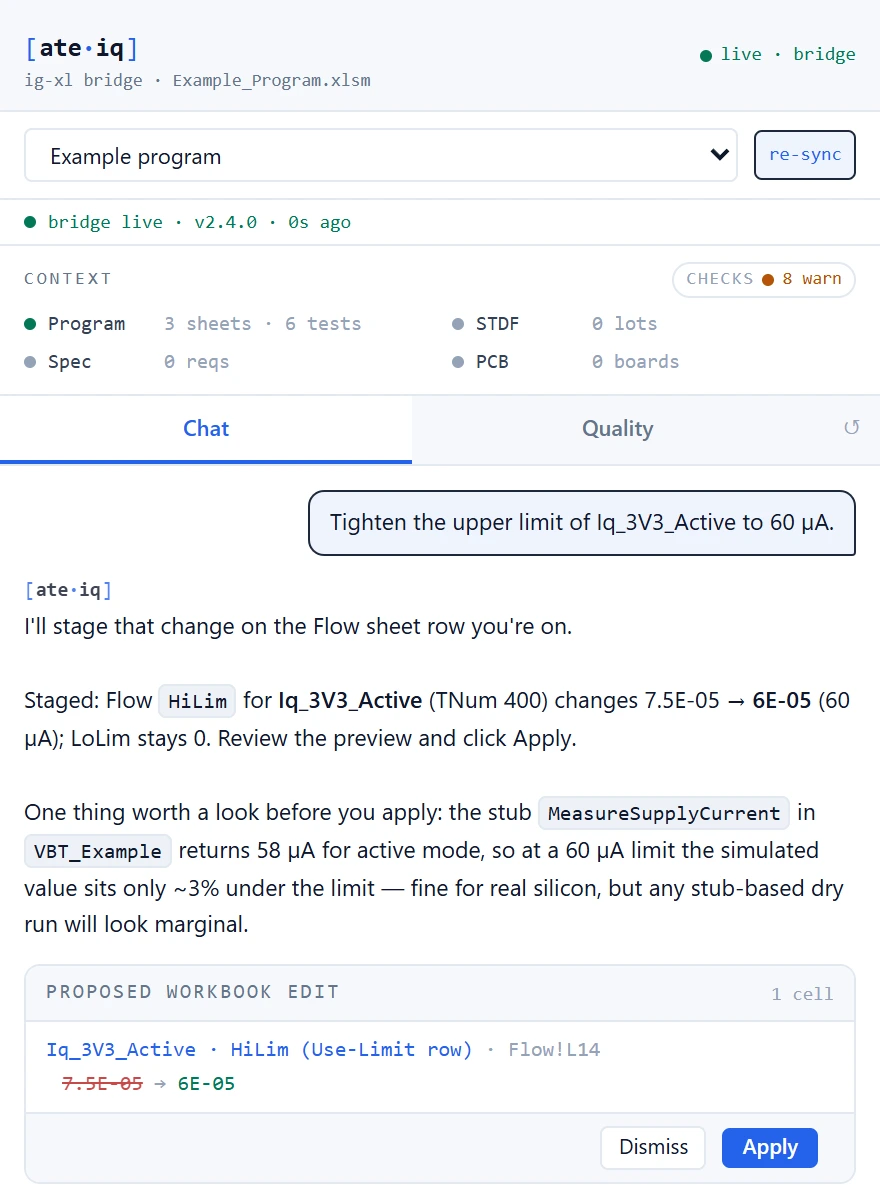
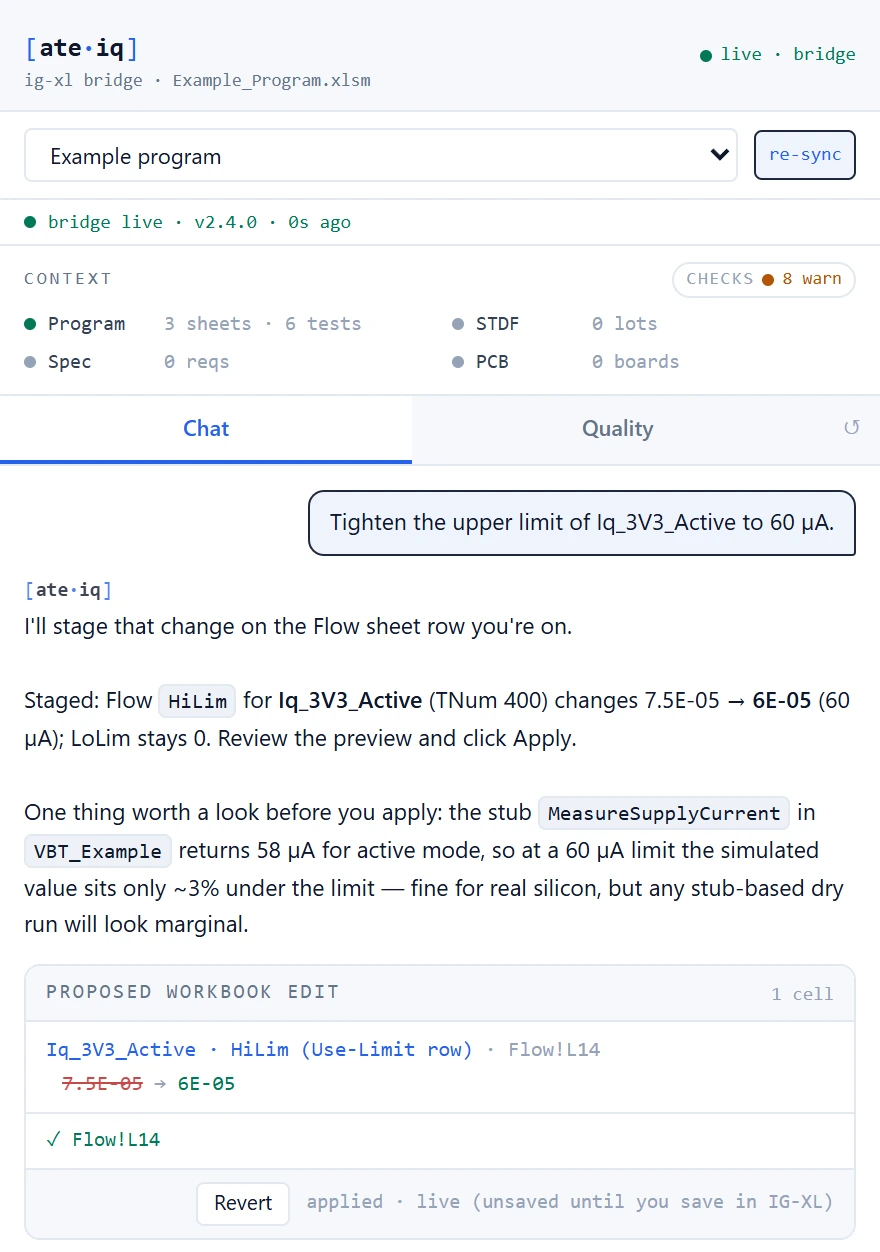
An agent that works where the test program lives. Open it from the ATE·IQ tab in Excel and it follows the program you have open — every sheet, the VBA editor's current state with your unsaved edits, and the cell you are on. Ask what a test engineer asks: it answers with tools that compute, and every change it proposes is previewed, applied on your click, and reversible.
Where it lives
Nothing new to learn. The agent is an Excel add-in with its own ribbon tab, and a window that opens beside the workbook.
One ribbon tab, nothing per program
The ATE·IQ tab carries Open Agent, Open IDE, Sync now and Bridge status. The add-in binds to whichever program you open or switch to, so in Excel there is nothing to configure for each test program.
With the program loaded
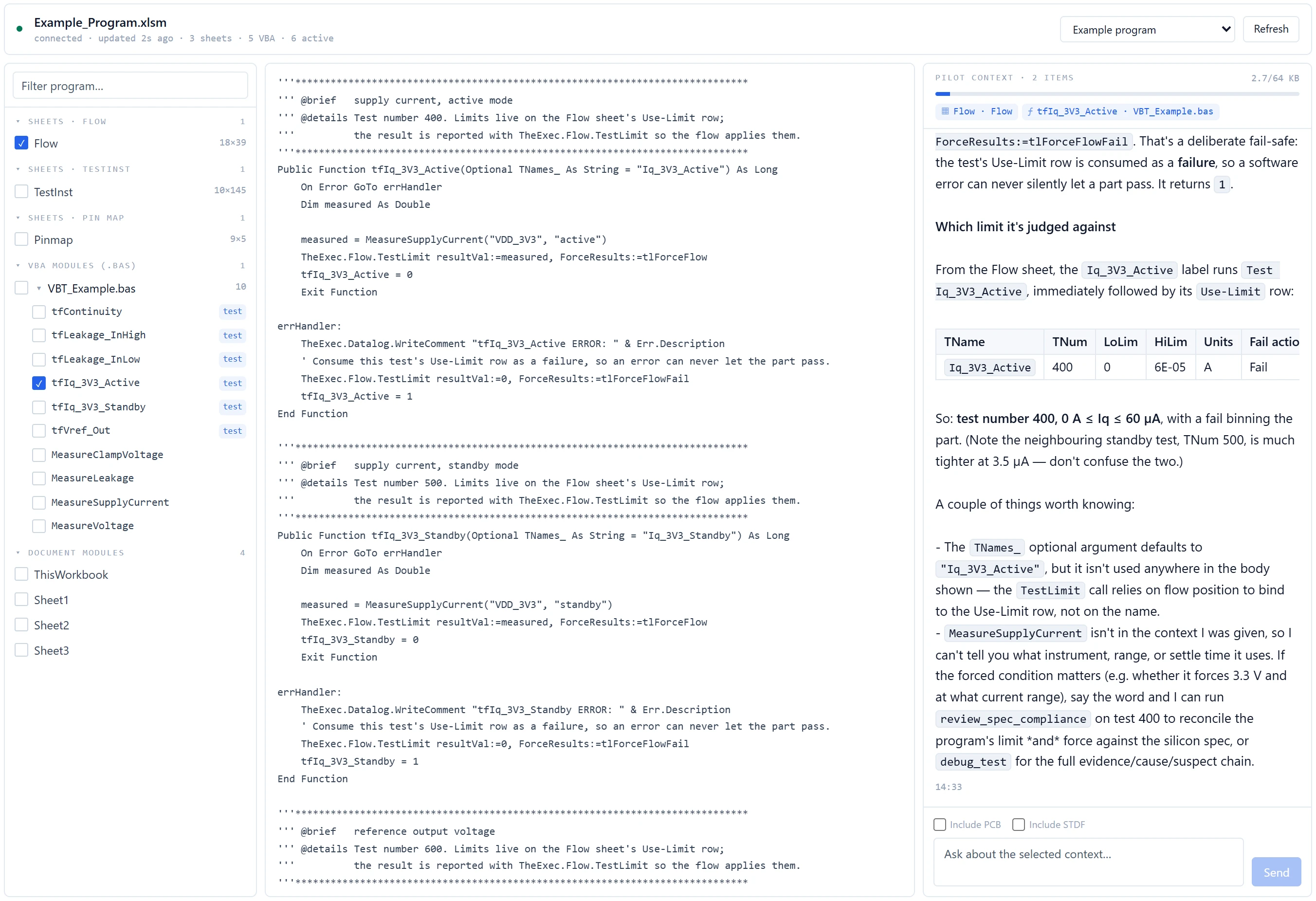
With a test program loaded in IG-XL, the agent streamed the live program: its sheets, its VBA and the engineer's cursor position.
The same agent, the whole project
ATE·IQ Chat in the desktop app runs the same agent with the whole project behind it, and a Live Workbook view lets you pick a test, module or sheet and ask about exactly that. An edit staged there uses the same reviewed card and applies to the open workbook through the add-in.
The add-in: per-user, no admin rights
One add-in file in your profile and two per-user settings; the desktop app installs separately. If your organisation's policy locks access to VBA projects, the install script tells you so instead of failing silently.
It sees what you see
Answers start from the program on your screen, not from an export or a copy saved an hour ago.
| What it reads | How |
|---|---|
| Every sheet | The add-in streams the open program's worksheets to ATE·IQ on your machine every few seconds while it is connected. |
| The live VBA | The VBA editor's current state, including edits you have not saved — so a review or an explanation matches what is on screen. It works even for a program IG-XL has loaded and nobody has saved. |
| Your cursor | The sheet and cell you are on travel with the stream, so “this limit” or “this cell” means the one you selected. |
| Sheets IG-XL has not loaded yet | IG-XL fills some sheets only when they are opened. The agent says their contents are unknown instead of calling them empty or broken. |
| Only what the question needs | Each question gets the sheets and the procedures it concerns. When something is left out for size, the agent is told what, and says so. |
| The project | Reading the workbook stores its sheets and VBA in the project, so the Excel window, the desktop chat, the code map and traceability all work from the same program. |
| A saved program archive | ATE·IQ can also read a saved IG-XL program archive's sheets and VBA directly, without opening Excel — a record of what the archive holds, not proof that IG-XL accepts it. |
What you can ask
“Tighten this limit to 60 µA.”
It resolves “this limit” from your cursor, stages the change on the row IG-XL reads limits from, and shows the before and after. You apply it; Revert puts it back.
“What does this VBT procedure do?”
It reads the procedure's real source from the open editor and checks IG-XL API and instrument facts in its built-in knowledge — for example, why an error handler forces a failure instead of letting the part pass.
“Write a helper module for this test.”
It drafts the VBA, checks it against the IG-XL API before proposing it, and stages the whole module for your review.
“Did the spec's new limits reach the program and the lots?”
Spec, flow limit and the limit each lot ran, side by side from the same reconcile the traceability dashboard uses, with the owner of each mismatch named.
“Why is this lot failing?”
Yield by site and bin, first-fail paretos, Cpk and outlier screens from the STDF itself, and a cause chain for the test you name: the lot evidence, the limits it is judged against and the board components on its nets.
“Propose limits from the latest lot.”
Proposals computed from lot statistics, each classified tighten, widen or leave alone, with the cases where the data is too thin said out loud. It never writes a limit.
“Will this program compile?”
ATE·IQ's offline pre-flight checks on the open program, with the list of what was checked and what only IG-XL itself can confirm.
“Does the board still match the program?”
The program's pins against the bound board's nets, and the channel plan through the native DIB checker, naming what it skipped for missing inputs.
Edits you approve
The agent proposes; you decide. Nothing is written to the workbook until you click Apply.
- ProposeA sheet field, a block of cells, or a whole VBA modulea field edit names the test and the column, and ATE·IQ finds the exact cell — including the limit row a flow table really reads; an ambiguous target is refused, not guessed
- PreviewBefore and after, with its validation findingsa VBA change is checked before it is offered; an error the change introduces blocks Apply until it is fixed
- ApplyWritten into the open workbook by the add-inApply waits for the add-in to confirm each operation, and a failure is reported as a failure
- RevertThe previous values go backthe add-in never saves the workbook: saving stays your decision
Two modes, 35 tools
The agent window opens in Edit mode: the IG-XL knowledge tools plus the workbook editor, fast and focused on the program in front of you. Switch to Debug mode and it has all 35 tools and the project behind it — production data, spec compliance, coverage, the load board and pre-flight. The desktop chat always has all 35. The model calls them mid-answer, and every answer lists which ones ran.
| Tool group | What it does |
|---|---|
| IG-XL knowledge · 9 | Instrument rules and settle times, known prohibitions, VBT API questions answered with the exact access path to call, debug and best-practice guidance, standard tests for each device class, industry test standards and test methodology. |
| STDF · 9 | Yield and bin summaries, parametric Cpk, limit drift, wafer maps, first-fail and test-time paretos, functional-test fail tables, cross-lot correlation and outlier screens, computed from the parsed binaries. |
| Load-board knowledge · 4 | ATE load-board design patterns and rules, and the routing constraint that goes with each tester pin type. |
| Board designs · 4, design edits · 1 | Validate or analyse a saved design by name, search the parts library and pull part details. A design edit is checked before it lands and journals to revision history. |
| Channel map · 2 | Suggest tester channels for pins the saved plan leaves blank — your own picks are kept — and run the native DIB checker over the saved plan. |
| Spec compliance · 1 | Limit and force comparison between spec, program and production, from the same reconciliation the traceability dashboard uses. |
| Coverage · 1 | Requirements with no test, tests with no requirement, tests with no production data — presence on test number, not a verdict on the code. |
| Debug · 1 | A cause chain for one test number: the lot evidence, the limits it is judged against, and the board components on its nets as advisory suspects. |
| Pre-flight · 1 | The offline pre-flight checks that can be decided from the open program, naming the ones that need the assembled project. |
| Limit proposal · 1 | Program limits proposed from lot statistics and classified tighten, widen or leave alone. No model arithmetic, and no write path. |
| Workbook edits · 1 | Stage a field, cell block or VBA module change as a preview with its validation findings. |
Checks while you work
A running count of findings
While you edit, the agent window keeps a count of structural and VBA findings across the live program, without being asked.
Pre-flight the open program
The same offline gate generation uses, run on the program as it is in Excel, with what it deferred to IG-XL named.
33 VBA rules
Findings at the exact line, a development profile for bug-class rules and a production profile that adds style, maintainability and performance — the same registry that reviews synced programs.
See and shape what it receives
The Context Curator shows the scored slice of the project a question would send — workbook sheets, VBA modules, board designs, requirements — lets you toggle it item by item, and hands the result to a chat. Use it when you want to see and trim the project context a question sends before you ask.
The IG-XL knowledge in your own assistant
The nine IG-XL knowledge tools also run as an MCP server, so an MCP-capable assistant your team already uses — Claude Code, Claude Desktop or your own agent — can call them directly. It starts on demand when the assistant needs it; there is no resident server to run.
Shown on the demonstration project
On a demonstration project for a small motion sensor with a 4-wire SPI interface — a 16-requirement spec, the IG-XL program generated from it, and synthetic lots with defects planted on purpose:
Measured on the demonstration project. Lots are synthetic with planted defects. In the lot answer, two summary figures — a first-fail remainder row and a baseline rate — did not match the tools, and the per-site yields reached it through project context rather than an STDF tool.